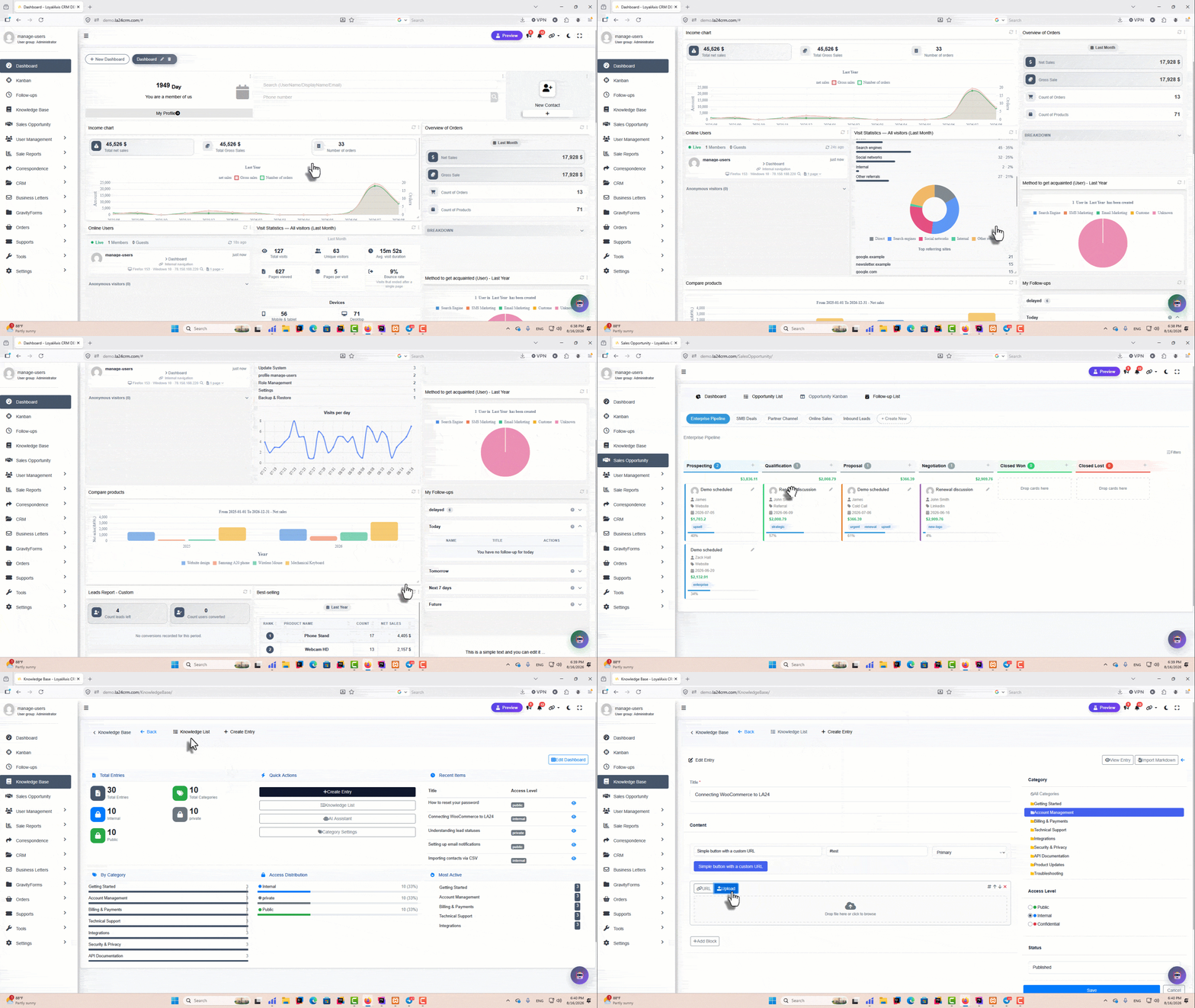
Sales Pipeline (Opportunities)
Create an unlimited number of sales pipelines and automatically assign customers to specific pipelines through workflow automation. You can also define role-based access for each sales agent so they only see the leads and customers relevant to their assigned pipeline.
In addition, the system supports a wide range of sales operations such as follow-ups, order creation, and other opportunity-related actions.
You will also always have access to sales funnel reports, enabling you to evaluate and analyze overall sales performance and system effectiveness.
Customer Messaging via SMS + Email + WhatsApp
Easily send both manual and automated messages to customers across multiple channels within the system. This helps you stay consistently connected with your leads and customers and improve engagement throughout the sales process.
Advertising Campaign Analysis & Measurement
If you advertise on Google or any other advertising platform and use UTM-tagged links to measure the effectiveness of your campaigns, we provide you with a tool that is more precise than Google Analytics and more practical for analyzing advertising campaigns.
With this tool, you can analyze the performance of different campaigns more accurately and allocate and spend your advertising budget more strategically and effectively.
WooCommerce Discount Marketing (Automatic Coupon Generation & Delivery Across Events)
With this feature, you can generate and send discount coupons through any outgoing message (SMS / Email / WhatsApp) from anywhere in the system—including automation workflows, customer profiles, reports, targeted lists, and audience segments.
Sales agents can also instantly create and send a discount code with a single click during phone calls with customers, making real-time deal closing faster and more effective.
Sales System (Fully Integrated with WooCommerce and All Platform Features such as Automation, Messaging, etc.)
This module enables you to build workflows for WooCommerce orders, manage role-based access for viewing and editing order data, add custom fields to orders, control order statuses, and design automated actions such as sending SMS, email, or WhatsApp messages to customers and sales agents.
It also supports order tracking, assignment of multiple responsible roles per order (e.g., sales manager, shipping manager, etc.), custom processing based on order data, and the ability to generate invoices and proforma invoices directly from the customer profile in just a few clicks. Full order item management is also included.
This module eliminates the key limitations of WooCommerce for in-store sales environments, enabling your team to operate with a powerful, unified sales system alongside your online store.
Order Workflow + Access Level Management
How does an order get completed in your organization? After an order is placed, do you have a production team involved, or does your warehouse handle shipping immediately?
With this capability in WordPress CRM, you can design a fully customized workflow for your orders so they move through each stage of fulfillment with complete accuracy until final completion.
You can define exactly how your process works—from sales to production to shipping—and ensure every order follows the correct path without errors or confusion. Each responsible user will only have access to the information they need, with the ability to view, edit, or submit data based on their assigned role and permissions.
This creates a structured, controlled, and highly efficient order management system tailored to your business operations.
Proforma Invoice + Invoice + Shipping Label (WooCommerce)
The printable version of invoices in LoyalAxis CRM offers a key advantage over other plugins: deep integration with WooCommerce, full order data synchronization, and highly flexible customization options for different business needs, including standardized tax handling and compliance.
You can generate and print proforma invoices, final invoices, and shipping labels directly from WooCommerce orders, with complete control over layout, branding, and displayed fields. Every document can be tailored to match your company’s visual identity and operational requirements.
Unlike typical solutions, this system ensures full consistency with WooCommerce order data while allowing you to customize the document environment, apply tax standards, and adapt formats for different workflows or departments—making it a powerful and production-ready invoicing solution for both online and offline sales operations.
Office Automation + Letterhead Builder + Digital Signature + Organizational Correspondence + Task Assignment
Alongside the CRM capabilities, you can experience a powerful and fully integrated office automation system that adds multiple advanced subsystems to your workflow.
Organizational Correspondence System
Create a complete letter management system for incoming, outgoing, and internal communications.
Automatic Letter Numbering
Generate structured and customizable sequential numbering for all documents based on your organization’s rules.
Letterhead Builder (Drag & Drop Form Designer)
Design fully customized letter templates using a drag-and-drop builder. Forms can be exported as PDF or printed directly, with complete control over layout and structure.
Task & Request Assignment System
Assign any item (task, letter, request, or record) to colleagues. Users are automatically notified when a response or action is required on an assigned item.
Digital Signature System
Add signature fields to any form (such as official letters). Users can sign documents digitally using a stylus or pre-defined signature images. Signed documents can be exported directly using your custom-designed letterhead.
Additional Productivity Tools
Includes practical features such as a To-Do List widget and other productivity-focused components that become more evident during daily use of the system.
This module transforms your CRM into a complete enterprise office automation platform, enabling structured communication, document control, and seamless collaboration across your organization.
Quick Invoice Creation + Payment Link Sharing (WooCommerce)
A unique capability in this WordPress CRM is the ability to instantly generate a WooCommerce order invoice and send a direct payment link to customers through SMS, Email, or WhatsApp.
This feature allows your team to create and share payment requests in just a few clicks, significantly reducing the time between negotiation and payment completion, and helping you close more sales efficiently.
Unlike other plugins, this functionality is built with years of WooCommerce experience and deep system optimization, making it a rare and highly practical tool designed specifically to increase conversion rates and accelerate your sales process.
Elementor Pro Form Builder Integration
Incoming submissions from forms created with Elementor Pro are fully integrated into the system, providing advanced features such as marking submissions as read, assigning access permissions for managers to view submissions, maintaining a submission history within user profiles, and automatically generating leads from completed forms.
Integration with Gravity Forms
Gravity Forms is a popular WordPress form builder with powerful features that let you create any type of form — from contact forms and job applications to service sales and more.
With LoyalAxis CRM, you can easily manage incoming form submissions and grant view access to the relevant forms for each user role — all without needing access to the WordPress admin dashboard.
Additionally, when you view a user’s profile, you can see and track all the forms they have submitted on your site.
Beyond these features, you can also generate a sales lead automatically when a visitor submits a form, and then advance your marketing campaigns using the automation module.
Integration with eForm
Generating leads from on-site forms and managing incoming messages are common challenges for any WordPress site.
With our seamless integration, you can rest easy. By installing the eForm plugin and creating your desired forms, all necessary coordination for managing incoming messages is automatically handled.
Follow-Up and Reminders
Your organization’s agents can create follow-up tasks for customers or various matters, either for themselves or other team members.
Additionally, before a follow-up is due, they can set reminders to be sent via SMS or email at a specified time.
This feature ensures that nothing ever gets forgotten in your organization.
Professional WooCommerce Product Management + Bulk Product Editing
The default WordPress dashboard is great for site designers but can be challenging for sales managers and other user roles.
We’ve built features that allow you to grant specific user roles limited product management access—such as editing prices only.
Additionally, you can bulk edit products via Excel files, making WooCommerce store management easier and more efficient than ever.
Dashboard Builder (Operational / Business Intelligence)
## **Dashboard Builder (Operational / Business Intelligence)**
In this WordPress CRM, every role in your organization can have a fully customized dashboard tailored specifically to their responsibilities.
For example, a sales manager can access a reporting-focused dashboard, while a sales agent can work with an operational dashboard designed for daily tasks and execution. Each role sees exactly what they need—nothing more, nothing less.
With this powerful dashboard builder, you can create any type of dashboard for any role in your business, enabling better decision-making, improved productivity, and a clear separation between operational and analytical views across your entire organization.
Customer Time and Credit Management System
If your business is B2B and you offer purchase credit to your customers, this is a unique feature for you.
By defining credit policies, you can allow customers to place orders while they have available credit. When their credit runs out, personalized notifications will be sent to both the customer and the responsible agent to prompt payment settlement.
We provide tools within this feature to give you full visibility of your customers’ credit status and automatically prevent orders from customers with outstanding debts.
Website Visitor Tracking & Monitoring System
If you want to stay one step ahead of your customers, get real-time visitor statistics, open a customer’s profile before they even call, and see all their information at a glance.
The Website Visitor Tracking & Monitoring System shows you exactly who is currently on your website, which page each visitor is viewing, how long they have been on the site, and where they came from. The system works directly on your public-facing website, not just inside your CRM, allowing you to see your customers’ actual behavior in real time.
The system is designed to be completely invisible to visitors. It does not slow down your website because the data collection process is not handled by the website pages themselves. Instead, a very lightweight background script reports visitor activity, much like analytics tools such as Google Analytics.
Website Traffic Analytics
Just like Google Analytics, you can analyze your website traffic in detail. Generate accurate and actionable reports covering everything from the average time spent on the website to the visitor’s device, browser, and traffic source.
Get comprehensive, easy-to-understand reports presented through charts and visual dashboards, giving you valuable insights into how visitors interact with your website.
Business Knowledge Base
By creating and managing structured knowledge articles within the knowledge base, and defining different access levels such as Public, Team Members, Managers, and other custom roles, you can significantly simplify onboarding and speed up employee training processes.
This ensures that the right information is available to the right people at the right time, improving internal communication and reducing dependency on direct support channels.
In future updates, by integrating the knowledge base with AI capabilities, you will be able to provide automated customer support and even automate parts of your sales and service workflows.
Additionally, you can publish a public-facing knowledge base on your website, allowing customers to easily access guides, tutorials, and documentation, find answers to their questions, and independently explore product-related information.
User Access Switching
Easily switch into any user account with a different access level—no password required—so you can perform reviews and provide support whenever needed.
Meeting Minutes Management
After each meeting, simply record the action items, resolutions, and decisions in the meeting minutes form. With just one click, you can convert these items into tasks in the project management system, assign them to the relevant team members, and track their progress.
Hierarchical Project Management
A unique Loyal Axis solution for managing large-scale and complex projects through a hierarchical, pyramid-based structure.
This capability enables clients and project owners to maintain visibility across the entire project, while each team lead can manage and monitor their own team and its performance.
At any moment, you can view and measure project progress, monitor team performance, and make informed decisions based on up-to-date project data.
Human Resources Management
Manage your employees throughout their entire lifecycle, from recruitment and hiring to their departure from the organization.
From managing the recruitment process and comparing candidates to handling employee offboarding, reassigning their outstanding tasks to other team members, and transferring or revoking granted access permissions, every step can be managed in an integrated and structured manner within this module.
Automation System (What should happen in each event?)
The automation module in this WordPress CRM is a powerful workflow engine that lets you define exactly what should happen when a specific event occurs in your business.
From lead conversion to order processing workflows, this system allows you to design fully automated business processes without any manual intervention.
For example, when a lead becomes a customer, or when a new order is created, you can automatically trigger actions such as sending messages, assigning tasks, updating records, notifying team members, or moving items through different stages of your workflow.
This module is one of the most essential tools for modern businesses, enabling you to stay ahead of competitors by turning repetitive operations into intelligent, automated processes that work continuously in the background.
Webhooks for Integration with n8n and Other Applications
The automation engine in this WordPress CRM supports fully customizable webhooks that allow you to connect your CRM with external systems such as n8n, Zapier, and other automation or integration platforms.
For every key event in your system—such as creating a new customer profile, updating a lead, or placing a WooCommerce order—a webhook can be triggered automatically and send structured data to your external workflow tools.
For example, when a new order is created in WooCommerce or a new profile is added in the CRM, a webhook can instantly call your n8n workflow, enabling you to process data, trigger automations, send notifications, or integrate with hundreds of external services in real time.
This makes the system a powerful hub for seamless connectivity and advanced automation across your entire business ecosystem.
SMS Module (Notifications + Marketing)
With this module in WordPress CRM, you can quickly send both single and bulk SMS messages from anywhere within the system.
Thanks to deep integration with other modules such as automation workflows, you can automatically send personalized SMS messages to customers or team members based on specific events and triggers throughout your business processes.
In addition, the system supports advanced features such as blacklist management, message templates, shortcode variables, and scheduled SMS campaigns, making it easy to streamline both customer communication and marketing activities in a structured and efficient way.
Email (Notifications + Marketing)
Just like with SMS, you can send emails whenever needed.
We have designed templates for this system to prevent your emails from being marked as spam and simplified the email sending process for all system employees.
This module offers amazing features you won’t find in any other email sending platform.
WhatsApp (Notifications + Marketing)
With this module in WordPress CRM, you can freely send text messages and files directly to your customers via WhatsApp.
Just like the email and SMS modules, once connected to a supported WhatsApp gateway, you can send messages individually, in bulk, or fully automated based on system events and workflows.
This module supports the same core capabilities as email and SMS communication, enabling you to manage customer engagement, notifications, and marketing campaigns through one of the most widely used messaging channels—fully integrated into your CRM and automation system.
CRM Integration with Mail Servers via SMTP
Connect to mail servers using the SMTP protocol and run your email marketing campaigns.
Drag-and-Drop Email Design with Google Standards Compliance
If you do email marketing, you’ve certainly faced the challenge of designing attractive emails that meet Google’s standards.
This CRM includes a unique and exceptional feature that lets you create appealing, Google-standard-compliant emails using drag-and-drop—helping to prevent your emails from being marked as spam.
We’ve also provided ready-made templates for you to easily edit or create your own templates and reuse them in future campaigns.
Birthday Congratulations and Similar Scenarios
What happens on your customer’s or lead’s birthday?
Want to send a congratulatory message? Or create and send a discount code?
Either way, make your customers happy while advancing your sales goals.
Congratulate on Special Occasions or Send Event Notifications at Scheduled Times
Set everything up before your campaign starts and run it stress-free on the campaign day.
Whether your campaign audience is 10 people or millions, we’ve built-in features to ensure your campaign runs flawlessly.
Target Groups (Customer Segmentation)
Preparing data is the most important step for advertising and sales campaigns. With this system, you can easily segment customers and leads to get ready for your campaigns.
For example, if you want to target male customers over 30 who purchased product X in the last three months but did not buy product Y, this system makes it possible effortlessly.
This is just one example — you can create any type of segmentation you need.
WooCommerce Report Builder
We’ve developed a comprehensive report builder for WooCommerce, giving you complete visibility into your store’s performance. Without this module, a WooCommerce store simply lacks access to real sales insights. With it, you can track, analyze, and optimize every aspect of your business with confidence.
Sales Funnel Report
From your registered sales opportunities, you can generate precise sales funnel reports and track customer status at every stage of the sales process within the system in WordPress CRM.
By analyzing these reports, you can identify bottlenecks and weaknesses in your sales pipeline, evaluate the performance of your sales agents, and take more effective actions to improve overall results.
These insights help you increase conversion rates, optimize your sales process, and significantly enhance the productivity and efficiency of your sales team through data-driven decision-making.
WooCommerce Customer Panel
This CRM includes a modern, built-in user panel for WooCommerce that you can activate when needed. Designed specifically for your customers, it allows them to easily manage their orders, account details, and personal information—all in one place.
Integration with VoIP System
If your call center uses a VoIP (IP-based) system, by enabling this module you can view customer information in the CRM simultaneously with incoming calls.
If the caller is not yet registered, you can quickly and easily create their profile and save their information.
Kanban (Scrum Board)
We have built a flexible Scrum/Kanban board within this WordPress CRM that can be used across different departments in your organization.
This board can be adapted for a wide range of use cases—from personal daily task management to collaborative project tracking and team-based workflows.
It helps you visualize tasks, monitor progress across stages, and manage work efficiently in a structured and transparent way, ensuring better coordination and productivity across your entire business.
Customer Visit Management System
If you're looking for a structured way to manage customer visits, this feature is built just for that. It allows your sales representatives or field agents to easily plan their routes and daily tasks. What makes it truly unique is its powerful set of tools—automatic scheduling of follow-up visits after successful meetings, auto-creating visits when a new customer profile is added, logging delays and their reasons, and much more.
With flexible configuration options for system admins, you can implement any scenario that fits your business workflow.
Role-Based Access and Responsibility Management System
**A Truly Unique Feature You Won’t Find in Any Other CRM**
This powerful capability lets you restrict access to customer and order information for employees and agents based on their roles. It’s especially effective in commission-based systems, where controlling visibility can make a significant impact. With this feature, you can ensure data privacy, prevent overlap in sales efforts, and drive performance through focused access.
Workflow Automation
For the first time in the history of WooCommerce and WordPress, we’ve introduced a module that allows you to route tasks, customer profiles, orders, and more across different departments within your organization.
If your team has more than three members, this module will be a game-changer—helping you streamline operations, reduce bottlenecks, and ensure nothing falls through the cracks.
Data Cleanup Tool
As a manager, maintaining clean and accurate customer data is always a concern—but we’ve got you covered. We’ve identified the most common data issues, and with just one click, you can automatically clean up your store’s records, customer profiles, and sales leads.
Comprehensive video tutorials are available to guide you through every step.
Excel Data Import
Easily import customer and lead data into the system using Excel. A step-by-step guide on how to prepare your spreadsheet and upload the data is included directly within the plugin—making the process fast, simple, and error-free.
Secure Data Box in Ticketing System
In this WordPress CRM ticketing system, you can securely receive and manage sensitive customer information through a dedicated Secure Data Box, ensuring that only authorized agents have access to the data.
All submitted information is stored in an encrypted format, guaranteeing the highest level of security and confidentiality for your users’ data.
This feature enables you to safely handle sensitive materials such as documents, files, source code, credentials, and other confidential information, while maintaining strict access control and full data protection across your support workflow.
Lead & Customer Management + Unified Profile System
A fully integrated system designed to help you manage leads and customers in harmony with all other modules—guiding you through the journey of converting leads into loyal customers.
Packed with powerful features like user tagging, color-coded statuses, profile history, and more—each of which is typically sold separately in other CRMs. Here, they come built-in, working seamlessly together to maximize your efficiency.
Loss Reason Tracking
If you're looking to identify why certain sales don’t convert, this module is made for you. It allows you to track reasons for lost sales across any custom form—whether it's WooCommerce orders, contracts, or others.
There are two ways to collect this data:
1- Manually entered by the sales agent.
2- Through an automatically generated survey link sent to the customer.
With powerful built-in reporting tools, you can analyze the most common failure reasons and take action based on priority to improve your sales process and customer experience.
CRM Customization (Build Any Form with Custom Fields)
Every business has its own unique processes—and this module gives you the flexibility to create any type of form you need, such as contracts, warranties, service requests, and more.
You can route these forms through your organization using the Workflow module and automate related actions at different stages with the Automation module. Tailor your CRM to fit your exact needs—no coding required.
Build Checklists and Spreadsheets
Specialized Checklist and Spreadsheet fields have been added to the Enterprise Form Builder, allowing you to create virtually any workflow—such as website development checklists, network service checklists, or any other custom checklist your organization requires.
The Spreadsheet field also enables you to capture, organize, and manage structured data such as laboratory test results, measurements, inventories, or any other information that would typically be maintained in a spreadsheet, all within your forms.
Project Timesheet Management
With the features built into this system, you can define the personnel involved in each project and allow them to record their work reports as timesheets.
Managers can review and analyze personnel performance reports based on working hours, labor costs, and other management metrics.
This system provides various features, including work report correction requests, Excel export, advanced reporting, and dozens of other capabilities to help manage projects, monitor team performance, and improve operational processes with greater accuracy and efficiency.
Profile Customization
Enriching customer and lead profiles over time empowers you to run highly targeted marketing campaigns and deliver exceptional support. In modern marketing, deep customer understanding is essential.
This module provides you with the tools to build comprehensive, multi-dimensional profiles—ensuring every interaction is personalized, relevant, and impactful.
Ticketing System
If you have a support department and offer after-sales service, the Ticket module is a modern support system designed to streamline operations and significantly reduce business costs.
It comes packed with features to help you build a robust, efficient customer support workflow—making it easier to manage inquiries, track issues, and deliver timely, high-quality responses to your customers.
Notifications
It is an event and news notification system designed for your customers and employees. With the notification system, you can create highly configurable notifications for specific user roles or individual users and generate reports on their views and read status.
These notifications can be displayed in the CRM panel, the WooCommerce user account panel, and even directly on the website.
Another key feature of this system is its integration with the PWA module, allowing you to send push notifications directly to users.
User Role Management
If you have team members beyond the main system admin, this module is essential. It allows you to define custom user roles and assign precise permissions to each—ensuring every team member has access only to the tools and data relevant to their responsibilities.
Automatic Data Backup
Schedule automatic backups of your data (for example, every night at 1:00 AM) and archive them either on your system or on a backup server. You can also specify how many days you want to retain previous backups, helping you control and manage your hosting storage space.
Another feature of this system is the ability to notify the administrator after a backup has been completed.
The system is also compatible with large and heavy databases, allowing you to create backups reliably and efficiently even for databases with a significant amount of data.
Surveys (Orders / Support / Contracts / Custom Forms)
In this WordPress CRM, you can design fully customized surveys for orders, contracts, support tickets, and any other personalized forms to measure customer satisfaction across different stages of your business.
With this feature, you can define your own questions and assign them to specific processes such as order completion or service delivery, enabling you to collect structured feedback based on responsible agents, teams, or departments.
These insights help you evaluate service quality, improve customer experience, and make data-driven decisions to enhance performance across your organization.
Abandoned Cart Marketing
With this feature in WordPress CRM, you can monitor cancelled and abandoned orders and automatically design strategies to bring them back into your sales funnel.
The system allows you to track incomplete purchases and trigger targeted actions such as reminders, personalized messages, or automated workflows to re-engage customers and encourage them to complete their purchase.
This helps you recover lost sales opportunities, increase conversion rates, and optimize your overall revenue by turning abandoned carts into completed transactions through intelligent automation.
Link Shortener
Easily shorten long URLs with just a few clicks and view their unique visit statistics.
Maintenance Mode
There is no need for an additional plugin to create a beautiful maintenance mode page. With just one click, you can put your website into maintenance mode.
The system also provides dedicated customization options for the maintenance page, allowing you to create an attractive and professional page with a countdown timer showing visitors when your website and services will be available again.
Content Calendar
The content team can manage content creation and publishing, assign responsibilities, set schedules, and give managers access to reports on the team’s performance and workflow.
Blog Management
Instead of using the WordPress dashboard, manage and grow your website’s blog directly from the CRM content editor. Improve your content with tools such as Rank Math integration and AI-powered optimization.
Advanced Excel Export of Data
Export your data to Excel with customizable filters and columns.
Quick Setup Wizard (Step-by-Step Configuration)
This feature in WordPress CRM allows you to configure parts of the system through a simple, guided setup wizard.
By answering a few basic questions, you can automatically set up key system settings without needing technical knowledge or manual configuration.
This step-by-step onboarding experience helps you get started faster, reduces setup complexity, and ensures your CRM is properly configured from the beginning based on your business needs.
PWA (Android & iOS App-Like Experience)
LoyalAxis CRM is fully optimized for mobile, and with this module enabled, you’ll enjoy an exceptional user experience on both Android and iOS devices.
Whether on desktop or mobile, activating the PWA module significantly improves performance—doubling page load speed and delivering a smooth, app-like interface directly from your browser.
Advanced Warehouse Management
Integrated management of warehouses, inventory, stocktaking, and inbound and outbound warehouse transactions, fully synchronized with the Accounting and WooCommerce modules.
With this module, you can accurately manage and monitor inventory while seamlessly recording and tracking all processes related to goods receiving, dispatching, and transfers between warehouses.
Courier Delivery Code System
Another unique feature designed to streamline WooCommerce order deliveries via couriers. With this system, each order is completed using a delivery code that the customer provides upon receipt—creating a clear, secure handoff.
Not only does it help prevent delivery issues, but it also leaves a positive impression on customers, increasing the likelihood of repeat purchases.
AI Call Analysis & Summarization (VoIP)
This upcoming feature in WordPress CRM leverages artificial intelligence to automatically analyze and summarize recorded VoIP calls after each conversation.
Once a call ends, the system processes the conversation and generates a structured summary directly inside the CRM, making it easy to review key points without listening to the full recording.
In addition, the AI suggests relevant next actions such as creating follow-ups, generating orders, opening support tickets, or triggering automation workflows—allowing you to execute decisions instantly with a single click and improve response speed and customer management efficiency.
AI Smart Responses for Customers, Staff, and Managers
This upcoming feature in WordPress CRM enables an AI-powered assistant that responds intelligently to questions from customers, sales agents, and managers based on structured business data.
Using your knowledge base, customer records, and categorized system information, the AI delivers context-aware answers tailored to each user role—whether in sales, support, or administrative departments.
It acts as an experienced virtual team member across your organization, helping users make faster decisions, resolve issues more efficiently, and access relevant information without manual searching or delays.
AI Smart Replies for Support Tickets (Coming Soon)
This upcoming feature in WordPress CRM enables intelligent, AI-powered responses for support tickets based on structured system data.
By analyzing your knowledge base, customer history, orders, and previous support interactions, the system generates the most relevant and accurate replies for each incoming ticket.
This ensures faster response times, more consistent support quality, and reduced workload for your support team, while improving overall customer satisfaction through context-aware and data-driven assistance.
Floating AI Chat Box (Your Assistant)
Ask the AI anything, anytime. It works like a trusted, experienced colleague who knows your organization inside and out and can quickly answer your questions.
It can also perform certain tasks, such as creating tickets or scheduling customer follow-ups, and provide you with reports and updates.